

Get Expedia reviews into Google Sheets.
One endpoint call, the Google Sheets setup steps, and a field-to-column map. Then keep it refreshing on a schedule.
Trusted by hospitality teams at





One source, one destination.
Expedia
Expedia pairs guest reviews with a rates endpoint that returns nightly prices for concrete dates. The property ID sits right in the hotel URL, after the h. Here the reviews endpoint pours that text into Google Sheets as sortable rows.
Google Sheets
Google Sheets is still the fastest way to get data in front of people who do not write code. One Apps Script function turns a sheet into a live feed your whole team can read, filter, and chart. On this page it holds Expedia reviews, refreshed from one endpoint call.
One endpoint returns Expedia reviews.
The Expedia Hotel Reviews endpoint returns clean JSON for one hotel. Send your key in the X-API-Key header. See the
endpoint docs for every parameter.
Wire Google Sheets to the endpoint.
-
01
Create a StayAPI account and copy your API key from the dashboard.
-
02
Open your sheet, then Extensions > Apps Script.
-
03
Paste the fetch script below and set your API key.
-
04
Run it once to authorize, then add a time-driven trigger to refresh on a schedule.
Apps Script: fetch and write rows.
This uses the real endpoint URL with the example hotel id. Swap in your hotel id and your API key.
function refreshData() {
  var url = "https://api.stayapi.com/v1/expedia/hotel/reviews?property_id=1582716";
  var response = UrlFetchApp.fetch(url, {
    method: "get",
    headers: { "X-API-Key": "YOUR_API_KEY" },
    muteHttpExceptions: true
  });

  var body = JSON.parse(response.getContentText());
  var records = (body.data && body.data.reviews) || body.reviews || body.rooms || [];

  var sheet = SpreadsheetApp.getActiveSheet();
  sheet.clear();
  sheet.appendRow(["retrieved_at", "id", "rating", "text", "reviewer_name"]);

  var now = new Date();
  records.forEach(function (r) {
    sheet.appendRow([now, r.id, r.rating, r.text, r.reviewer_name]);
  });
}
50 free requests on signup, no card.
Response fields to columns.
Each field from the Expedia Hotel Reviews response, and a suggested column name.
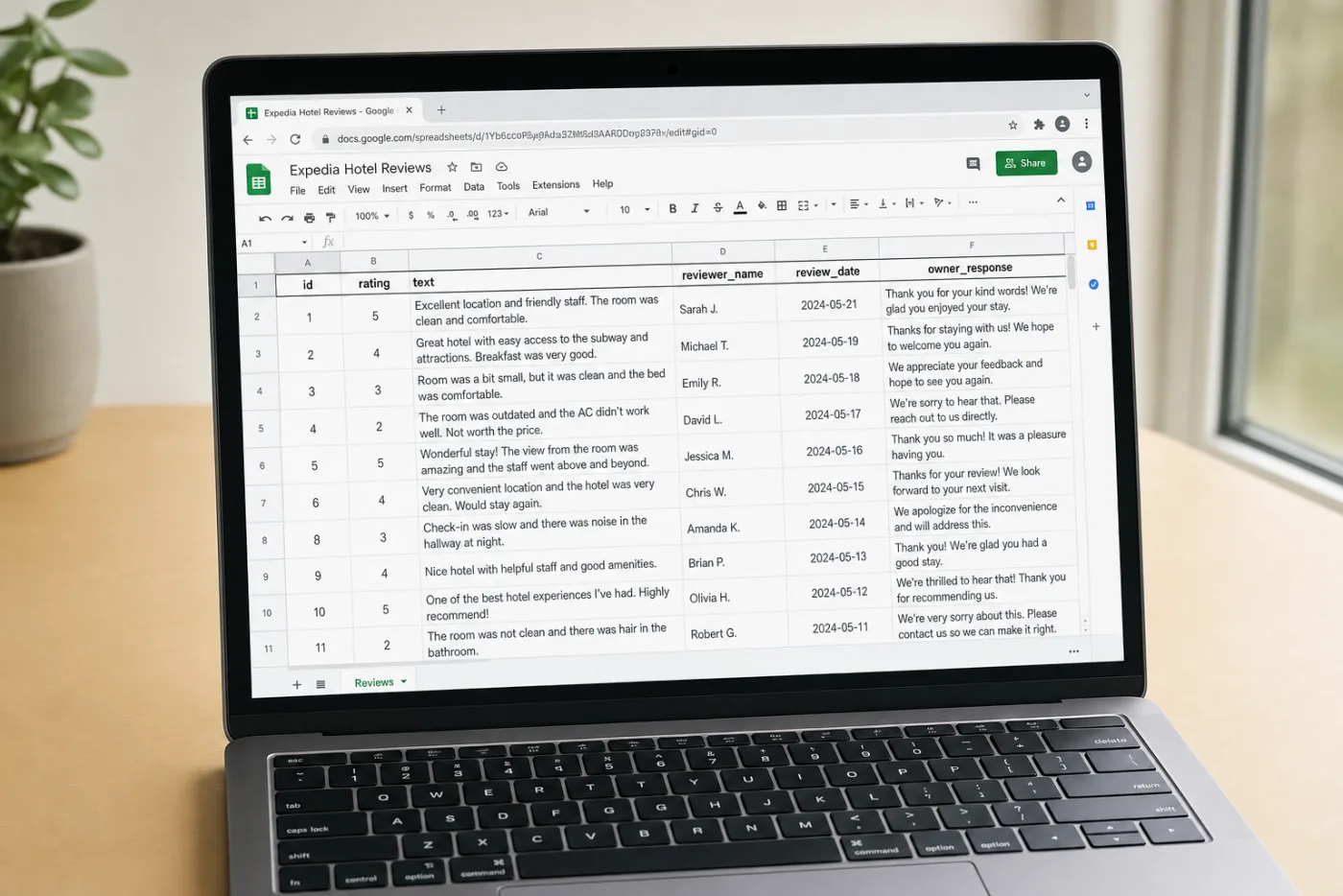
What it looks like in Google Sheets.
The fields from the mapping above land as columns: property_id, id, rating, text. Refreshed on the schedule you set.
The columns you get
Every row is one hotel record from the Expedia Hotel Reviews response. These fields become columns:
- property_id
- id
- rating
- text
- reviewer_name
- review_date
More Expedia pipelines.
Get your key.
Sign up, copy your key into the snippet above, and pull live Expedia reviews into Google Sheets.
Try it free
50 free requests on signup. Fastest way to see if the schema fits.
Start freeTalk through your pipeline
15 minutes. Volume, endpoint mix, and where the data lands. Walk out with a quote.
Book a demo